Enterprise cloud backup software tends to be configured with a set number of days, and this is never modified by any company. However, “How far back can we restore?” and “How long do we need to retain these files?” are two different questions which have different answers, but which get confused all too often.
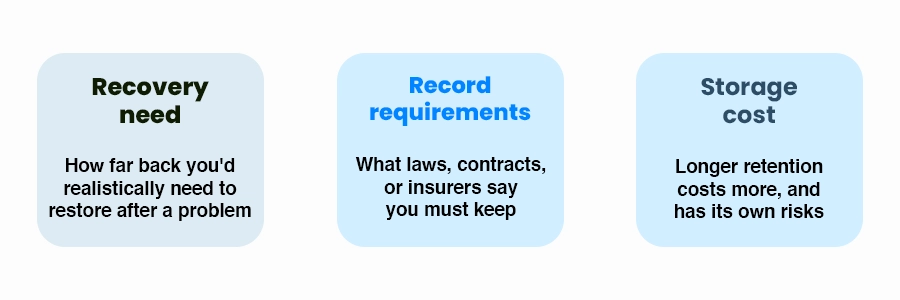
Cloud Backup Retention refers to the backup retention period after which the backups are purged to make space for new ones. While this sounds very technical, it’s actually a business-related choice for enterprise cloud backup that depends on three factors: how you would realistically recover data, any obligations imposed by your industry/contracts, and cost considerations. In our “disaster recovery vs. backup” piece, we discussed the wider context between cloud backup vs storage. The current article zeroes in on the backup retention period aspect.
recovery need for cloud retentition
Two different questions for Cloud Backup Retention
Question
What it’s really asking
Who decides
Operational recovery
If something goes wrong, how far back might we need to restore to find a good copy?
Your business and IT provider, based on risk
Records retention
How long are we required to keep certain records at all?
Law, regulation, contracts, and your accountant or attorney
Legal hold
Is there a dispute or investigation that means we must not delete anything relevant?
Your attorney
A backup is not automatically your official record
Enterprise cloud backup systems are designed for recovery purposes, not for adherence to records-retention policies. If some of your data needs to be kept for a particular amount of time, this generally implies the need for proper archiving rather than just using for long backup retention period. There is no way for us to tell you what your exact requirements are. It depends on the nature of your business data backup and records.
Thinking through operational recovery
It is essential to note that problems can sometimes go unnoticed for quite some time. It might take several weeks before one realizes that an existing file has been overwritten by mistake. Similarly, malware or compromised accounts may not cause any harm to your system until several weeks later. If your retention period is less than that of identifying the problem, all business data backup will have the same problem.
Frequent, short-term copies for everyday mistakes: Daily copies that are kept for a few weeks cover the situation: someone deleted or replaced something last week.
Less frequent, longer-term copies for slow-to-notice problems: Weekly or monthly backups are stored for months. These backups help with issues that take time to appear. Storing them is much cheaper, than keeping every backup for the same amount of time.
Long-term archives only where something requires them: Year-end or other lived copies make sense for records you’re actually required to keep or choose to keep. These should be treated as archives.
Such an arrangement is sometimes referred to as a “grandfather-father-son” rotation in terms of backup retention period. This type of arrangement is fairly popular because of its effective compromise between recovery and storage expenses. The particular time intervals for enterprise cloud backup may vary from company to company; please see the hierarchy as a framework for customization in business data backup.
Longer isn’t always safer
However, maintaining data for an unlimited period has its drawbacks too: increased cost of storage, increased number of data in case of any backup breach, and possible contradiction with privacy requirements or policies related to data deletion. The key point here is a certain retention period chosen intentionally by you.
A short review you can do this week
Retention review
Discover what it is that your backup software is truly set to save. Most companies never have.
Ask: if a problem went unnoticed for a month would we still have a copy from before it started?
List any records you must keep and confirm the requirements, with your accountant or attorney.
Check your computer insurance policy since some policies have backup related requirements.
There is no single figure that applies to all businesses. Some people begin by assuming several weeks worth of more regular copies along with monthly copies over a long time span, and then factor in the specific industry they belong to, the amount of data, and their budget
Usually there are requirements concerning record keeping, but they are about the records themselves, not your backup window. See what regulations apply to your industry through a compliance expert. We can help you with anything you decide on.
It will depend on how much your data varies and how your backups are stored. The tiered retention, which stores fewer long-term backups compared to the short-term ones, helps you keep the cost low
The basis difference between cloud backup vs storage is users can save their files and access them via the internet with cloud storage, whereas cloud backup provides duplicate copies of your files for you to be able to restore them in case of loss or damage to the files.
Backing up files in cloud storage is one of the ways for small business data backup that can ensure their critical files are protected against deletion and hardware issues as well as potential attacks on their data.
Conclusion and Next Steps
Cloud Backup Retention is an option that secretly determines whether the process of recovery will be easy or completely out of the question. Just a few moments spent picking it deliberately will outweigh whatever you got automatically when you installed the application. Talk to our IT team and we’ll walk through it with you.