Office hardware repair feels cheap now and a new machine feels expensive at first. This is the way that makes businesses keep repairing equipment longer than the point when repair is actually costing more, than replacement.
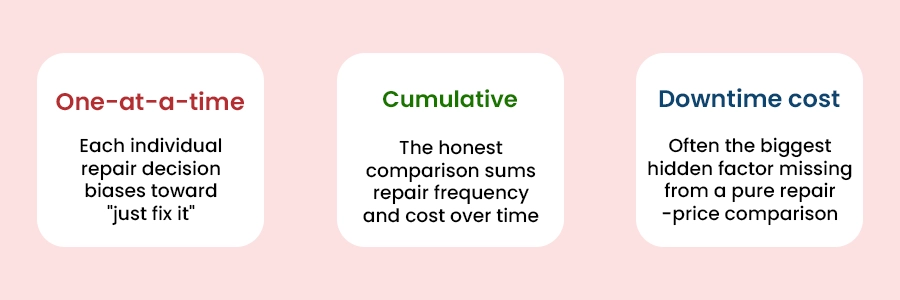
The comparison between Office Hardware Repair vs Replacement that really counts when a machine stops working isn’t “this repair, versus a computer”. It’s the total of all the hardware repair cost that will be needed during the time the machine still has left to live compared to the cost of buying a new one right now. Framed one repair, at a time repair always looks cheaper. This is why aging office hardware often gets kept well past the point where hardware is truly the more economical choice.
One-at-a-time Cumulative
A Framework for the Office hardware replacement actual decisions
Factor
Favors repair
Favors replacement
Repair frequency
This is the first issue in a long time
Repairs have become recurring or increasingly frequent.
Repair cost vs. replacement cost
Repair cost is a small fraction of replacement
Repair cost approaches a meaningful percentage of a new machine
Performance for current needs
The machine still comfortably handles current workload
It’s noticeably struggling with software or tasks it should handle
Downtime impact
Downtime during repair has minimal business impact
Repeated downtime is genuinely disrupting work
Security/support status
Still receiving security updates and vendor support
Operating system or hardware has reached end-of-support
Track repair history, not just the latest incident
Keeping a record of when machines were repaired and how much each repair cost shows patterns that are not obvious, at the time. The machine, which has already been repaired three times this year tells a different story when the repair cost is viewed together instead of when the hardware repair cost is viewed alone. This record is what turns the question “should we fix this again” into a evidence‑based decision turning it from a gut call into a decision based on evidence.
The downtime cost for office Hardware Repair vs Replacement people forget to count
Lost productivity during the repair window: An employee, who does not have a working machine for a day or more bears a cost that is indirect. That hardware downtime cost does not appear on the repair invoice.
IT time spent diagnosing recurring issues: Recurring hardware problem like troubleshooting, on the aging office hardware machine consumes support time that could be used for other work. That is a cost even if it is internal.
Risk exposure from unsupported software or hardware: A device that no longer receives security updates has a danger that is difficult to measure but is very real.
A practical decision checklist
Before deciding to repair again
Check this machines repair history for the twelve to eighteen months.
Look at the office equipment repair cost. Compare it to a realistic replacement cost. Don’t just look at the sticker price of the option.
Is the operating system or the hardware still getting security updates?
Find out if the computer is really able to handle today’s software requirements or if it is having a time doing so.
A common rule people use is that if one repair costs half as much as replacing something that’s a sign you should pay attention. This should be considered along with how often repairs are needed and how long the item is still useful. It’s not a rule, on its own.
Sometimes if a machine is in a low‑criticality role where downtime does not matter much like an used backup machine I find that the framework is most relevant, for equipment that my business truly depends on each day.
A simple spreadsheet that lists the machine, date, issue and cost per repair is enough to show a pattern. The specific tool matters less, than the habit of actually recording the machine, date, issue and cost per repair consistently.
To determine the costs of repairing office hardware, one must include the cost of parts, the cost of labor and maintenance, as well as the costs resulting from downtime due to malfunctioning hardware. One should compare the overall cost of repairs with that of buying new hardware.
Regular maintenance of computers, printers, and other network devices, installation of software upgrades, tracking of system performance and data backup are the steps that small firms may take to minimize downtime associated with IT. The provision of IT support in advance will help to avoid unplanned downtime and increase employee productivity. Ovron Inc. is here to assist you in keeping your technology working smoothly.
Conclusion and Next Steps
The truth about this decision means taking a look at the total pattern, not at individual instances – the way of just keeping track of repairs makes an instinctive guess something between Office Hardware Repair vs Replacement that can be judged based on facts. Talk to our IT team and we’ll walk through it with you.