

Looking for Epson printer support because your printer won’t stay connected to WiFi or keeps clogging after sitting idle? Both issues trace back to real, documented Epson design decisions: a WiFi band limitation most people aren’t aware of, and a print head technology that behaves differently than HP or Canon’s.
Why Epson Printers Drop Off WiFi More Than Expected
A lot of Epson printer models only work with the 2.4GHz WiFi band, not 5GHz — a limitation many other manufacturers’ newer models have moved past. A dual-band router may default a device to, or push it toward, the 5GHz network, which is why many people run into their Epson printer 5GHz wifi not connecting even though the printer worked fine before. The printer seems to briefly connect and then drop — that looks like a hardware issue, but it’s actually a band mismatch. If you’ve searched Epson printer won’t connect to wifi, or noticed your Epson printer can’t find network at all during setup, the band mismatch is almost always the cause. This is permanently fixed by connecting the printer directly to the router’s 2.4GHz network name.
This is also a search that’s quite susceptible to clicking the wrong link, particularly when searching for an Epson printer that won’t connect to WiFi. Several websites that rank for this exact problem are designed to look like live chat support, and in some cases a phone number is inserted directly into the page telling you to call right away. A genuine band-mismatch fix never requires a phone call, software install, or payment — it’s just a router setting. If something you’re seeing seems to be pushing you to call before explaining the actual issue, check our guide on spotting fake printer support sites.
For more information also read : Canon Printer Support: Decoding Support Codes and Ink Errors
Why Epson Print Heads Clog More Than HP or Canon
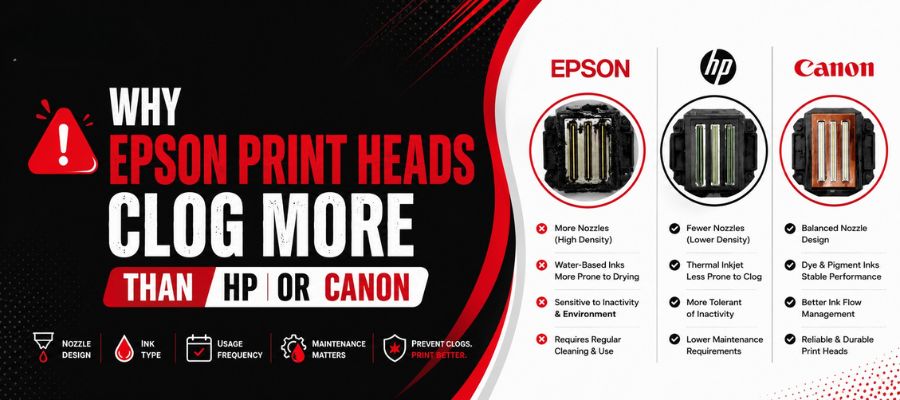
Thermal, or “bubble jet,” print heads are used primarily by HP and Canon and apply heat to ink to create a bubble that sprays it onto the page. Epson uses a different technique — a piezoelectric print head, a crystal that changes shape under electrical current and pushes ink out mechanically, without heat. Piezo heads typically last longer and handle a broader range of inks; however, they’re more susceptible to clogging if the printer sits unused for an extended period, because there’s no heating cycle to keep ink moving through the nozzles. This is particularly true for EcoTank printers, where the size of the ink reservoir can leave a printer sitting unused for weeks with no obvious low-ink prompt to trigger a print — which is exactly why Epson EcoTank clogged print head issues are one of the most frequent problems our Epson printer support team encounters
Fixing a Clogged Epson Print Head
Infrequent use of the printer causes the large majority of clogs. These are resolved by running a guided head-cleaning sequence (2 to 3 times) from the printer’s maintenance menu — fully diagnosable and fixable remotely by walking through the correct cleaning sequence and checking nozzle test output between cycles. If clogging continues despite multiple cleaning attempts, there’s likely a hardware issue, and an on-site visit may be necessary. If you also notice your Epson printer power light blinking orange alongside the clog, that’s typically a maintenance error or ink pad issue rather than a simple nozzle blockage, and it’s worth mentioning to your technician during diagnosis.
Epson Printer Repair Cost Near You
Remote diagnosis and fixes for WiFi band issues, clogging, and ink sensor errors typically run $29 to $200, quoted before any work starts — no call-now pressure, no software install required to get a price. On-site visits — reserved for confirmed mechanical faults like a feed mechanism issue — run $120 to $500, offered separately. Every completed repair carries a 1-year service warranty.
One Epson Printer Support at Home vs. an Office Fleet
A single Epson EcoTank at home gets the same remote diagnosis as a multi-unit WorkForce Pro office fleet. Offices that chose Epson for its lower cost-per-page benefit from a managed maintenance plan that runs scheduled print jobs or cleaning cycles across idle units — directly addressing the clogging risk that comes with Epson’s piezo head technology.
Is That Epson Support Site Actually Epson?
The same scam pattern targets searches for any brand with enough search volume, and Epson WiFi searches specifically are a common target — see our full guide on spotting fake printer support sites for the exact pattern and how to verify a provider before calling. Ovron Inc states plainly that it is independent and not affiliated with Epson.
Also Read : How to Spot a Fake Printer Tech Support Site (And What Real Help Looks Like)
Frequently Asked Questions
Epson’s print heads are piezoelectric, whereas HP and Canon’s are thermal. Piezo heads are durable but more prone to clogging during extended idle periods, since there’s no heating cycle keeping ink moving through the nozzles.
Yes, in most cases. The large majority of clogs from infrequent use are cleared by a guided head-cleaning cycle run 2 to 3 times, and this can be diagnosed and walked through remotely as part of standard Epson printer support.
Most often it’s because the router defaults the printer to a 5GHz network, and most Epson printers can only use 2.4GHz. This is permanently fixed by connecting to the 2.4GHz network.
Be cautious. WiFi connection problems are a frequent target for tech-support scam sites, and a genuine band-mismatch fix never requires a phone call or software install to get started. Read our guide on spotting fake printer support sites before calling any number you found in a search result.
Remote diagnosis and fixes run $29 to $200 depending on the issue.
Yes, with the same process and pricing — a single Epson EcoTank at home or a multi-unit WorkForce Pro office fleet.
Conclusion
Most Epson printer problems — a printer that won’t connect to WiFi, one that keeps dropping off a 5GHz network, one that can’t find your network at all, or an EcoTank with a clogged print head — trace back to two well-known design choices: Epson’s 2.4GHz-only WiFi support and its piezoelectric print head technology. Neither requires buying a new printer, and neither requires falling for a scam site with a flashing “call now” number. Whether you’re troubleshooting one Epson EcoTank at home or managing a full WorkForce Pro fleet at the office, most of these issues are resolved in a single session with Epson printer support, at a clear price, backed by a 1-year warranty.
Table of Contents


